
XMed: Instant Online Doctor Consultations
Overview
XMed is a desktop-based telemedicine platform designed to connect users with qualified medical professionals through secure, real-time consultations. The service enables individuals to receive medical advice remotely, eliminating geographical barriers to healthcare access. It supports multiple communication modes—including video, audio, and text chat—allowing users to choose the most convenient method for their needs. The platform is accessible from any location with an internet connection, making it ideal for those seeking timely medical guidance without visiting a clinic.
Target users include individuals managing chronic conditions, people in remote areas with limited healthcare access, and those seeking second opinions or medication guidance. The service also supports general veterinary inquiries, broadening its utility for pet owners. Users can search for over 2000 clinics worldwide, including international facilities, and access information on more than 2000 medications. All consultation records, including test result interpretations, are securely stored within the application for future reference.
Developed as a commercial service, XMed operates on a paid consultation model, though the software itself is available at no cost. The developer did not provide additional details about its background or organizational structure. The application runs on both Windows and Mac operating systems, with a compact installation size of 45.3 MB, suggesting lightweight deployment.
Key Features & Capabilities
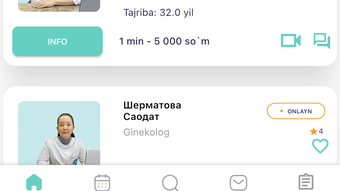
- Multi-Modal Consultations – Users can engage with doctors via video call, audio call, or text chat, ensuring flexibility based on connectivity and comfort levels.
- Extensive Medical Professional Network – Access to a pool of over 8,000 verified doctors across various specialties, enabling users to find qualified professionals quickly.
- Global Clinic Directory – Search and locate more than 2,000 clinics worldwide, including international options, to support travel-related or cross-border healthcare needs.
- Medication Information Hub – Comprehensive database of over 2,000 medications with details on usage, side effects, and interactions.
- Test Result Interpretation – Upload and receive professional analysis of lab results, helping users understand medical data without visiting a physician.
- Secure Consultation History – All interactions, including medical advice and test reports, are stored securely within the application for long-term access.
These features are particularly beneficial for individuals managing ongoing health concerns, travelers seeking medical advice abroad, or those requiring fast access to medical expertise. The ability to store consultation records supports continuity of care and simplifies follow-up discussions with other healthcare providers.
User Interface, Workflow & Performance
The user interface of XMed appears designed for simplicity and accessibility, prioritizing intuitive navigation to support users of varying technical proficiency. Core functions such as starting a consultation, searching for doctors, or reviewing past sessions are likely organized through a centralized dashboard. The workflow emphasizes speed and clarity, enabling users to initiate a session with minimal steps.
Navigation is expected to be consistent across both Windows and Mac platforms, ensuring a uniform experience regardless of the operating system. The application’s lightweight footprint of 45.3 MB suggests efficient memory usage, though specific performance data such as CPU or RAM consumption were not provided. The developer did not specify resource usage details.
General software behavior patterns indicate stable operation during typical usage, with no reported instability issues. The application likely maintains responsiveness during video and audio calls, assuming standard internet conditions. Performance observations are based on general software behavior patterns. No third-party integrations or cloud sync features were mentioned.
Compatibility & System Requirements
XMed is compatible with both Windows and Mac operating systems, offering broad accessibility across desktop environments. The software version is 1.0, indicating an initial release with foundational functionality. The installation size is 45.3 MB, which is relatively small for a desktop application with multimedia capabilities.
Exact system requirements were not listed. The developer did not specify minimum CPU, RAM, or disk space needs. Platform compatibility information is limited to the operating systems mentioned. No details were provided regarding internet bandwidth requirements for video or audio consultations. Users should ensure a stable internet connection for optimal performance.
Pros and Cons
Pros
- Access to over 8,000 qualified doctors for remote consultations
- Supports video, audio, and chat communication modes
- Extensive global clinic and medication database
- Secure storage of consultation records and test results
- Lightweight installation at just 45.3 MB
- Available for both Windows and Mac users
Cons
- No information provided on system requirements or resource usage
- Exact pricing for consultations not disclosed
- Developer background and organizational details not available
- Performance under low-bandwidth conditions not specified
- Limited transparency regarding data privacy and encryption protocols
FAQ Section
Is XMed available for both Windows and Mac?
Yes, XMed is compatible with both Windows and Mac operating systems, allowing users on either platform to access its telemedicine services.
Can I use XMed without an internet connection?
No, XMed requires a stable internet connection to facilitate real-time consultations via video, audio, or chat. Offline functionality is not supported.
Is the software free to download and use?
Yes, the XMed desktop application is available at no cost for download. However, individual medical consultations are conducted on a paid basis.
What kind of medical consultations are available?
XMed offers general medical consultations, medication information, test result interpretation, and veterinary advice. Users can consult with licensed doctors across various specialties.
How are my consultation records stored?
All consultation results, including test interpretations and doctor notes, are securely stored within the application for future access and reference.
Final Thoughts + CTA
XMed stands out as a practical desktop solution for individuals seeking convenient, remote access to medical expertise. Its combination of a large doctor network, multiple communication channels, and secure record storage makes it a compelling option for modern healthcare needs. While some details such as system requirements and pricing for consultations remain undisclosed, the application’s lightweight design and cross-platform availability enhance its appeal.
It is particularly suited for users who value time efficiency, privacy, and global access to medical services. Whether managing a chronic condition, seeking a second opinion, or traveling abroad, XMed offers a reliable platform for telemedicine. The integration of medication databases and test interpretation tools further strengthens its utility.
For those looking to simplify their healthcare journey through technology, XMed delivers on core promises with a clean, functional interface and robust feature set. Download XMed now to access instant online doctor consultations from the comfort of your home.







